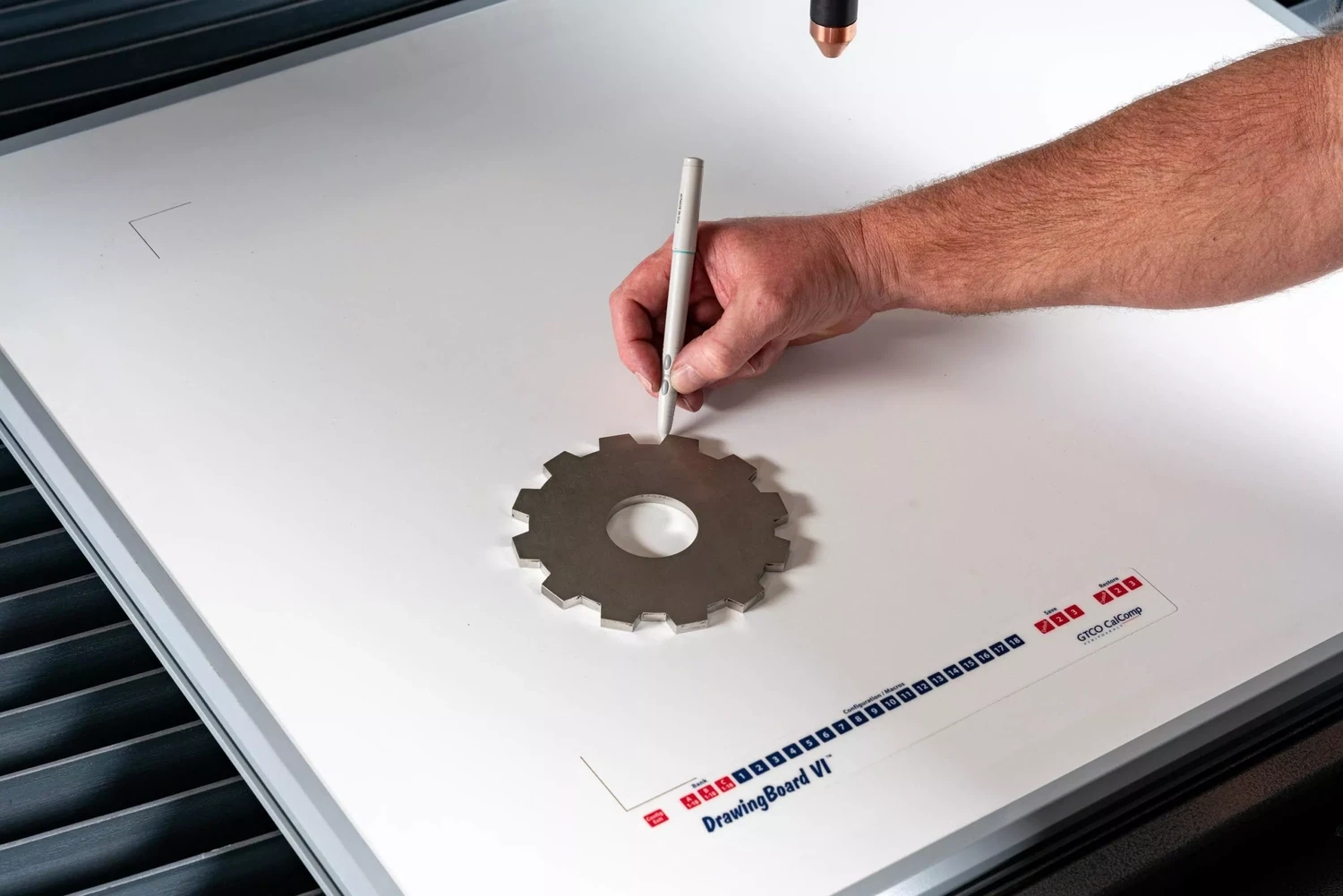
The Logic Trace System. Electronic board, pen and software
SKU No Drawing Board
Easy Trace and Save DXF Files. Training & Support included
LogicTrace Software
Drawing Board Size (0.01"/.254mm Accuracy)uk shipping automatically calculated & added to final price
Options
£0.00
Free Training Included
In stock
1
Tax's & Shipping Costs Calculated at Checkout
The Logic Trace System. Electronic board, pen and software
Product Details
The Logic Trace System.
Electronic board, pen and software
Designed specifically for the CNC, CAD and Pattern Making industries, The Logic Trace Digitizing System consisting of a digitizing tablet, pen and Logic Trace software can quickly and easily trace any outline, template, object, or part and create a DXF graphics file on your computer ready for use by any CNC, CAD or cutting software and machine. A separate windows-based computer is required for operation and use. Not compatible with Linux-based computers.
Whats Included
1x Drawing Board, 1x wireless stylus pen, cables included, software via download, +Free Training via zoom
Works with all machines: plasma cutters, waterjets, laser cutters, vinyl cutters, plotters, any and all CNC machines.
Works with all software: MyPlasm, Autocad, Plasmacam, Mastercam, Mach3, Bobcad, Vectric, Vcarve, SigmaNest, Solidworks, Rhino, CorelDraw, Adobe Illustrator, Gerber and many others. Our DXF files are compatible with all CNC and CAD software
Very easy to use, takes less than ten minutes to learn
Here are some benefits of using the Logictrace system:
- Accuracy: Logictrace allows you to create highly accurate digital versions of physical objects, templates, or drawings. The standard accuracy is 0.01 inches, with an even higher accuracy of 0.005 inches available for more demanding applications. This precision ensures that your digital files faithfully represent the original.
- Speed and Efficiency: Tracing with Logictrace is significantly faster than manual methods of creating CAD files. You can quickly trace an entire outline using the pen stylus or cursor in minutes, saving valuable time and effort in your workflow.
- Versatile File Compatibility: The system allows you to create DXF files, which are compatible with virtually all CNC and CAD software. It also supports other file formats like PDF, SVG, DXF-ASTM, and DXF-AAMA, making it suitable for various industries, including CNC machining, CAD design, and apparel manufacturing.
- Ease of Use: Logictrace is designed to be user-friendly and easy to learn. The process involves simply starting the software, tracing the item with the pen or cursor, and saving the graphic file. Most users can become proficient in less than ten minutes.
- Wide Range of Applications: Logictrace can be used across numerous industries, including metalworking, woodworking, plastics, furniture, upholstery, garments, sign-making, and boat manufacturing. It's useful for tracing parts, patterns, plans, maps, and more, making it a versatile tool for various design and manufacturing needs.
Logic Trace install Procedure
Computer Requirements Windows 8, 10, and 11. 64-bit computer, the software does not work on 32-bit computers. (If needed on a 32-bit computers, contact our office). 8 or 16 MB memory. Fairly fast processor. 100MB hard disk space. It may run on Windows 7 but not guaranteed.
Video We have a video on how to download and install the software: Video 1
Video We have a video on how to install the digitizer: Video 2
Install Download and install the software from the following link: Download Logic Trace for Windows
Install Download and install the serial-to-usb driver from the following link: Download Driver
Do not use Tabletworks The software does not use the GTCO Tabletworks driver. If you have installed tablet works on your computer, the Tabletworks driver will need to be uninstalled and the computer restarted.
Connect Cables Connect the USB-to-serial adapter to the USB port on the computer, wait 15 seconds and attach the serial cable to the serial-to-USB adapter and connect the other end of the serial cable to the digitizer. Attach the power supply to the digitizer and turn the digitizer on. The digitizer should beep when turned on. If using a cordless pen stylus or cursor, insert the batteries in the pointer and remember to touch a button on the pointer to activate the batteries before using them.
Note There should not be a USB cable connected directly between the computer and the digitizer. This is very important.
Note Every time the Serial-to-USB adapter is connected to the computer port, the digitizer needs to be turned off and on. This is very important.
Start software To start the software either click the Logic Trace shortcut on the desktop or click the start button of windows, scroll down, and click Logic Trace Software.
Security Code When running the software for the first time, the program will request a security code to register the software. Contact our office at 512-656-8195 or john.walsh@logicgroup.com, give us the blue number on the screen, and we will give you the security code to finish the registration.
Comm Port Driver After connecting the digitizer to the computer the comport setting needs to be changed in the Logic Trace software. Start the Logic Trace software, click Setup at the bottom, click test ports, and in the black screen will be a list of available comports. On the left choose one of the comports that says "serial to USB" and then click test ports. Digitize a point on the digitizer and see if an XY point appears on the screen.
Trouble Digitizing We have step by step instructions that solve almost all digitizing problems. In the Logic Trace Software, click 'Setup' then click 'Digitizer Help'
All Set Start tracing, have fun, make some money!
Computer Screen The software attempts to automatically adjust fonts and icons to the size of your computer screen. You can adjust the sizes in the program setup. If the sizes are too small or large, change them.
Cellphone, Ipad, Tablet setting up a cellphone, ipad, or tablet as an optional digitizer control device. Video
https://www.spacedesk.net/download/#server-driver
Please Note Shipping/Delivery can take 2-4 weeks
Customs Code
HS Code is 9017201000
Computer Equipment - Input Device - Digitizing tablet
Display prices in:GBP